Ansible Tutorial
Ansible, Chef, and Puppet are all automation tools built to cut down the time and complexity of configuring and maintaining a network, especially one with a large number of devices. Of the three, Ansible takes a notably different approach to its architecture.
Agentless Architecture
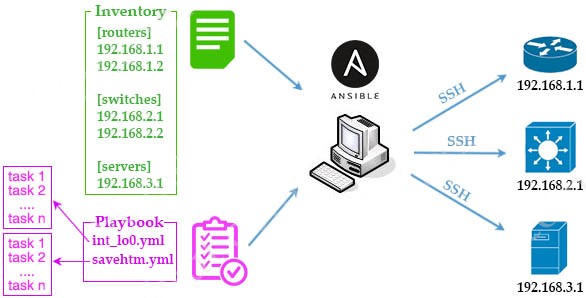
Unlike Puppet and Chef, Ansible is agentless: a managed device does not need any special client software installed on it at all. Instead, Ansible reaches out to each device using SSH (and NETCONF over SSH for network devices), pushing configuration changes out and pulling information back using nothing more than a standard management connection the device already supports.
Key Components
After Ansible is installed, a few types of files make up most of what you work with:
- Playbooks — YAML files that describe what Ansible should actually do: the actions and the logic behind them. A playbook is made up of:
- Modules — self-contained units of code that can be run either directly from the command line or as part of a task inside a playbook.
- Tasks — the smallest unit of work in Ansible; a task is a single action performed on a target host using a module.
- Inventory — a file listing the hosts Ansible is meant to manage, including addresses and ports, with hosts typically organized into groups to make managing large numbers of them easier.
- Templates — files that describe configuration using the Jinja2 templating language, allowing variables to be inserted into otherwise static configuration.
- Variables — YAML files holding the actual values that Ansible substitutes into templates and playbooks.
The rest of this article is for members
The full walkthrough, configuration examples and verification steps are available exclusively to paid members.
View membership plans Log in