Chef Tutorial
Chef is another automation platform used to configure and manage network and server infrastructure, in the same family as Puppet and Ansible. Its core idea is to treat infrastructure as code: instead of configuring machines by hand, applications, configuration, and policy are described in code and then deployed automatically across any number of machines or instances.
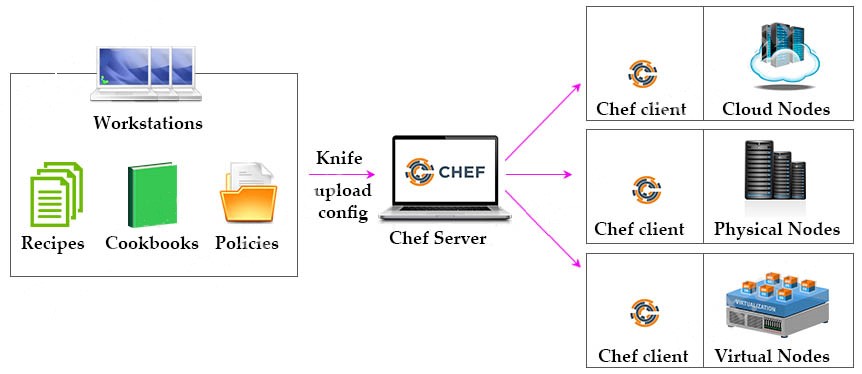
The Three Main Chef Components
1. Workstations
A workstation is simply the personal computer where an administrator writes, tests, and edits configuration code before pushing it out to the Chef Server. Every workstation includes a command-line tool called Knife, which is used to upload configuration changes from the workstation up to the Chef Server.
Two kinds of files are authored at the workstation:
- Recipes — a collection of resources that describes a particular configuration or policy. A recipe defines everything needed to configure a given component and the exact order those steps should happen in. For example, a recipe might describe how Chef should install and configure an application such as Apache HTTP Server, MySQL, or Hadoop.
- Cookbooks — a group of related recipes bundled together to cover a broader scenario. A cookbook contains everything that scenario needs: not just recipes, but also attributes, libraries, metadata, and any supporting files. Cookbooks are written using Ruby along with domain-specific languages tailored to particular resources.
2. Chef Server
The Chef Server acts as the centralized repository for the infrastructure’s configuration. It stores all of the cookbooks and policy information and is responsible for supplying the right configuration to every node in the infrastructure.
3. Nodes
Nodes are the actual servers where the configuration code runs — these can be cloud instances, virtual machines, or physical servers sitting in a data center. Each node runs a piece of software called the Chef Client, and it is through this client that the Chef Server manages the node: the client is what actually pulls configuration information down from the server and applies it locally.
The rest of this article is for members
The full walkthrough, configuration examples and verification steps are available exclusively to paid members.
View membership plans Log in