Cisco CLI Tutorial: IOS Modes and Basic Commands
In the previous tutorial we looked at how a Cisco router or switch boots up. Once that process finishes, the device lets you start typing commands — but which commands are available depends on which mode you’re currently in. This tutorial walks through the Cisco Command Line Interface (CLI) and the different modes you’ll work in on a router or switch.
Here are the modes you’ll run into most often:
| Prompt | Mode |
|---|---|
Router> | User mode |
Router# | Privileged mode (Exec mode) |
Router(config)# | Configuration mode |
Router(config-if)# | Interface level (inside configuration mode) |
Router(config-router)# | Routing engine level (inside configuration mode) |
Router(config-line)# | Line level — vty, tty, aux (inside configuration mode) |
Let’s go through each of these in more detail.
User mode (unprivileged mode)
This is usually the first mode you land in after connecting to the device. It gives you limited, non-destructive access — enough to check status and view statistics, but not enough to change anything in the configuration. Its default privilege level is 1.
Privileged mode
Also called Enable mode or Exec mode, this gives you a much broader command set than User mode, including access to everything available from Global Configuration mode — meaning you can actually make changes to the device’s configuration from here. Its default privilege level is 15, the highest level available.
Configuration mode
Reached from Privileged mode, Configuration mode (also called Global Configuration mode) gives you the full set of commands for configuring the device. From here you can drop into more specific levels — interface level, routing engine level, line level, and others.
Interface level
Some references call this “interface configuration mode” or just “interface mode.” It’s really a sub-mode of Configuration mode, which is why its prompt still carries the “config” prefix (config-if). You get here by specifying a particular interface while in Configuration mode, for example:
Router(config)#interface fa0/0
Router(config-if)#
One thing worth watching out for: the prompt itself doesn’t tell you which interface you’re configuring. It’s easy to lose track and accidentally configure the wrong one, so pay close attention here.
Routing engine level
This is where dynamic routing protocols — RIP, OSPF, EIGRP, and others — get configured. You’ll cover these in more depth later in your CCNA studies.
Line level
Here you configure parameters for Telnet, the console, and the AUX port. The same config-line prompt is reused for every line on the device, so — just as with interface level — you need to keep track of exactly which line you’re working on.
Note: “line” in this context can mean a physical console port just as easily as a virtual connection like Telnet.
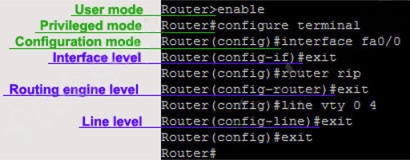
None of this is hard to pick up — the different modes will become second nature once you’ve spent some time configuring routers and switches. Just stay attentive to which mode and level you’re in each time you practice, and it’ll click quickly.