Rapid Spanning Tree Protocol RSTP Tutorial
Rapid Spanning Tree Protocol (RSTP) is the direct successor to the original Spanning Tree Protocol, standardized as IEEE 802.1w in 2001. Its main motivation was convergence speed: classic STP can take anywhere from 30 to 50 seconds to recover after a link failure, which is painfully slow for a modern network. RSTP brings that recovery time down to under 10 seconds.
How RSTP Speeds Things Up
The key mechanism behind this improvement is that RSTP introduces new port roles that can transition immediately into the forwarding state when needed, instead of passively waiting through the old listening and learning timers while the rest of the network reconverges.
RSTP Port Roles
RSTP defines five port roles:
- Root Port — the forwarding port on a switch that is closest to the root bridge, based on path cost. Exactly the same concept as in classic STP.
- Designated Port — the forwarding port responsible for a given LAN segment. Every segment has exactly one designated port.
- Alternate Port — the best backup path to the root bridge. If the current designated port for that segment fails, the alternate port is ready to take over immediately.
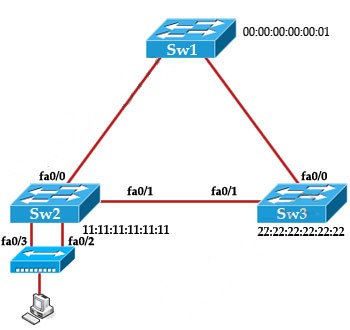
- Backup Port — a redundant path to the same network segment the switch is already connected to through another port. This situation can only arise when a switch has two separate links into the same collision domain, which typically happens when both links connect to the same hub.
- Disabled Port — a port that has simply been administratively shut down and takes no part in spanning tree at all.
The rest of this article is for members
The full walkthrough, configuration examples and verification steps are available exclusively to paid members.
View membership plans Log in