Subnetting Tutorial
Subnetting trips up a lot of people studying for CCNA, but the underlying idea is simple once it clicks. This tutorial builds it up from the ground: the default address classes, what “subnetting” actually means, how to work out subnets and hosts by hand, and finally a couple of shortcuts that let you solve subnetting questions in seconds instead of minutes.
Address classes and default subnet masks
| Class | Default mask | Address range |
|---|---|---|
| A | 255.0.0.0 (/8) | 1.0.0.0 – 126.255.255.255 |
| B | 255.255.0.0 (/16) | 128.0.0.0 – 191.255.255.255 |
| C | 255.255.255.0 (/24) | 192.0.0.0 – 223.255.255.255 |
Each class is defined by the leading bits of its first octet. Class A addresses always start with a 0 bit, which is why the class spans 1–126 (1 = 0000 0001, 126 = 0111 1110). The addresses 0.0.0.0 and 127.0.0.0 are reserved — for default routing and loopback testing respectively — so neither belongs to a class. Class B addresses start with 10, covering 128–191 (128 = 1000 0000, 191 = 1011 1111). Class C addresses start with 110, covering 192–223 (192 = 1100 0000, 223 = 1101 1111).
Classes D and E exist too, but they’re reserved for multicast and experimental use and can’t be subnetted, so they’re outside the scope of this tutorial.
The slash after an address (its CIDR prefix) simply counts how many leading bits of the mask are set to 1:
/8=1111 1111.0000 0000.0000 0000.0000 0000— 8 bits on/12=1111 1111.1111 0000.0000 0000.0000 0000— 12 bits on/28=1111 1111.1111 1111.1111 1111.1111 0000— 28 bits on/32= all 32 bits on — the maximum possible
Since a prefix length and a subnet mask describe the same thing, you can always convert between them: /8 is 255.0.0.0, /12 is 255.240.0.0, /28 is 255.255.255.240, and /32 is 255.255.255.255.
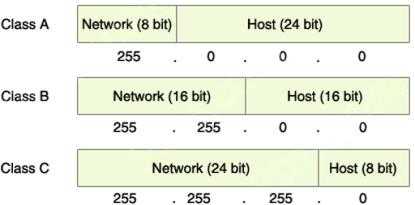
In a subnet mask, a 1 bit marks the network portion of the address and a 0 bit marks the host portion — which is exactly what lets you read off the network/host split for each class from its default mask above.
The rest of this article is for members
The full walkthrough, configuration examples and verification steps are available exclusively to paid members.
View membership plans Log in