Virtual Local Area Network VLAN Tutorial
What is a VLAN?
Most textbooks define a VLAN the same way they define a LAN: “a group of networking devices in the same broadcast domain.” That definition is technically correct, but it doesn’t actually explain what makes a VLAN useful — since, by that wording, a LAN and a VLAN sound identical.
A more useful way to put it: a VLAN is a group of devices in the same broadcast domain, logically. That one word — logically — is the whole point. Devices in the same VLAN can be scattered across different switches, different floors, even different buildings, and still behave as if they’re on the same local segment. A VLAN segments a network into separate broadcast domains in software, so that traffic only switches between ports assigned to the same VLAN — regardless of where those ports physically sit.
Why VLANs matter: a practical example
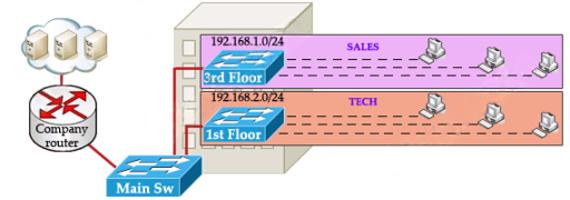
Picture a mid-size company with several departments — say, SALES and TECH — and a requirement to keep each department’s traffic separated so that each can only reach the resources it’s allowed to.
The obvious first approach: put each department on its own IP network and filter between them with an access list on the company router. SALES gets 192.168.1.0/24, TECH gets 192.168.2.0/24, and an ACL on the “Company router” controls what can reach what. Here’s that design without any VLANs involved:
The rest of this article is for members
The full walkthrough, configuration examples and verification steps are available exclusively to paid members.
View membership plans Log in