NTP Tutorial: Network Time Protocol
The Network Time Protocol (NTP) is a core service for Cisco gear — and really for almost any networked device. Every device needs its clock kept in sync with a reliable time source, such as an NTP server.
Accurate timekeeping matters more than it might seem, because a lot of other services quietly depend on it — logging and SNMP being two of the most common examples.
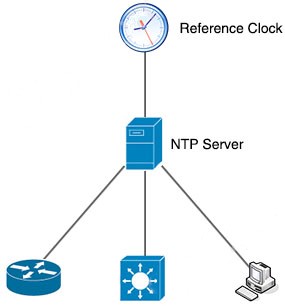
How NTP works
NTP follows a client/server model:
- NTP client: periodically reaches out to an NTP server to ask for the current time.
- NTP server: replies with its own current time, which the client then uses to adjust its clock.
An NTP server, in turn, usually pulls its own time from an authoritative source — a reference clock such as a radio clock or an atomic clock — and then passes that time along to the rest of the network.
NTP describes how far a device sits from that authoritative source using the concept of stratum — essentially, a hop count. A reference clock itself is stratum 0: assumed to be accurate, with essentially no delay. Stratum 0 devices aren’t used directly on the network, though — they’re wired straight into a computer, which then operates as a stratum 1 server, acting as the primary time standard for everything downstream.
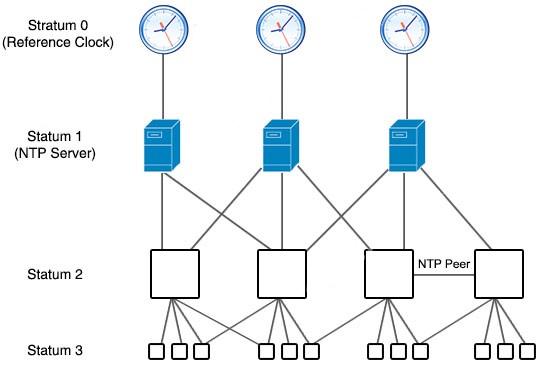
A stratum 2 server gets its time by querying a stratum 1 server; a stratum 3 server queries a stratum 2 server, and so on down the chain. Servers at the same stratum level can also peer with each other, which gives the whole peer group a more stable, more robust sense of time — for instance, two stratum 2 servers might peer with one another.
NTP communicates using the multicast address 224.0.1.1, over UDP port 123 as both source and destination.
The rest of this article is for members
The full walkthrough, configuration examples and verification steps are available exclusively to paid members.
View membership plans Log in